v1.0.201
Date released: November 12, 2025
New features and enhancements
AI Agents
SQL agent
A series of critical bug fixes and enhancements for the SQL Agent have been implemented, focusing on improving query execution reliability, maintaining state integrity, and upgrading the default intelligence model.
-
Corrected data provider handling: The correct data provider is consistently sent during query execution, resolving issues that previously caused execution failures or incorrect results.
-
Preserved query execution state: The query execution state is now moved to a persistent store. This fixes a bug where state was lost when messages scrolled out of view, ensuring running queries retain their status and the UI properly rehydrates to show current progress (running, results, or error).
-
Upgraded default LLM model: The default language model for all SQL Agent operations has been updated to GPT-4.1, resulting in higher quality and more consistent SQL generation. User-defined overrides are still respected.
-
Added message-level data provider selection: Users can now select the data provider (database dialect) per message. This allows the agent to generate SQL using the appropriate dialect (e.g., PostgreSQL, MySQL, Snowflake), drastically improving the accuracy and usability of the generated code.
Python agent
Significant enhancements have been made to the Python Agent backend to improve how generated output files are handled, ensuring greater stability and scalability.
- File storage transition: Generated output files from the Python Agent are now saved directly to Amazon S3 instead of being stored on the local server filesystem.
- Updated response format: The
generated_datasetresponse updated to reference the new S3 location. This change optimizes file storage, improves performance, and ensures that output files are reliably accessible, enhancing the overall execution of the Python Agent.
Data Source
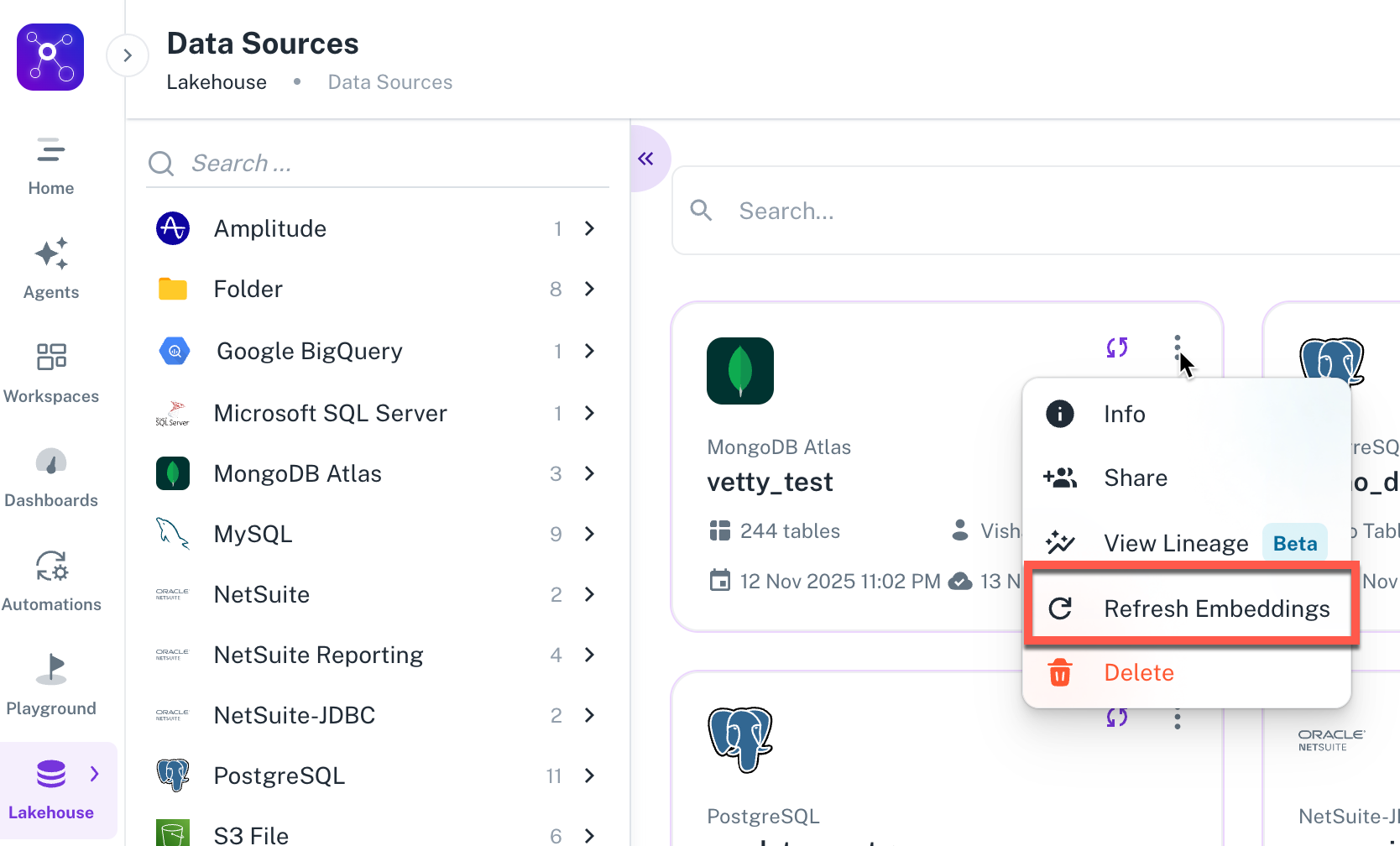
Users can now manually trigger the regeneration of vector embeddings for a specific data source at any time. Clicking the "Refresh Embeddings" button in the UI sends an immediate request to the AI server. Regenerating embeddings ensures the AI models are working with the most up-to-date vector representations of the data source schema, leading to improved accuracy and relevance in AI-driven queries. No manual backend intervention: This enhancement eliminates the need for manual backend processes to update embeddings.
Was this helpful?