v1.0.230
Date released: February 12, 2026
New features and enhancements
Agents
-
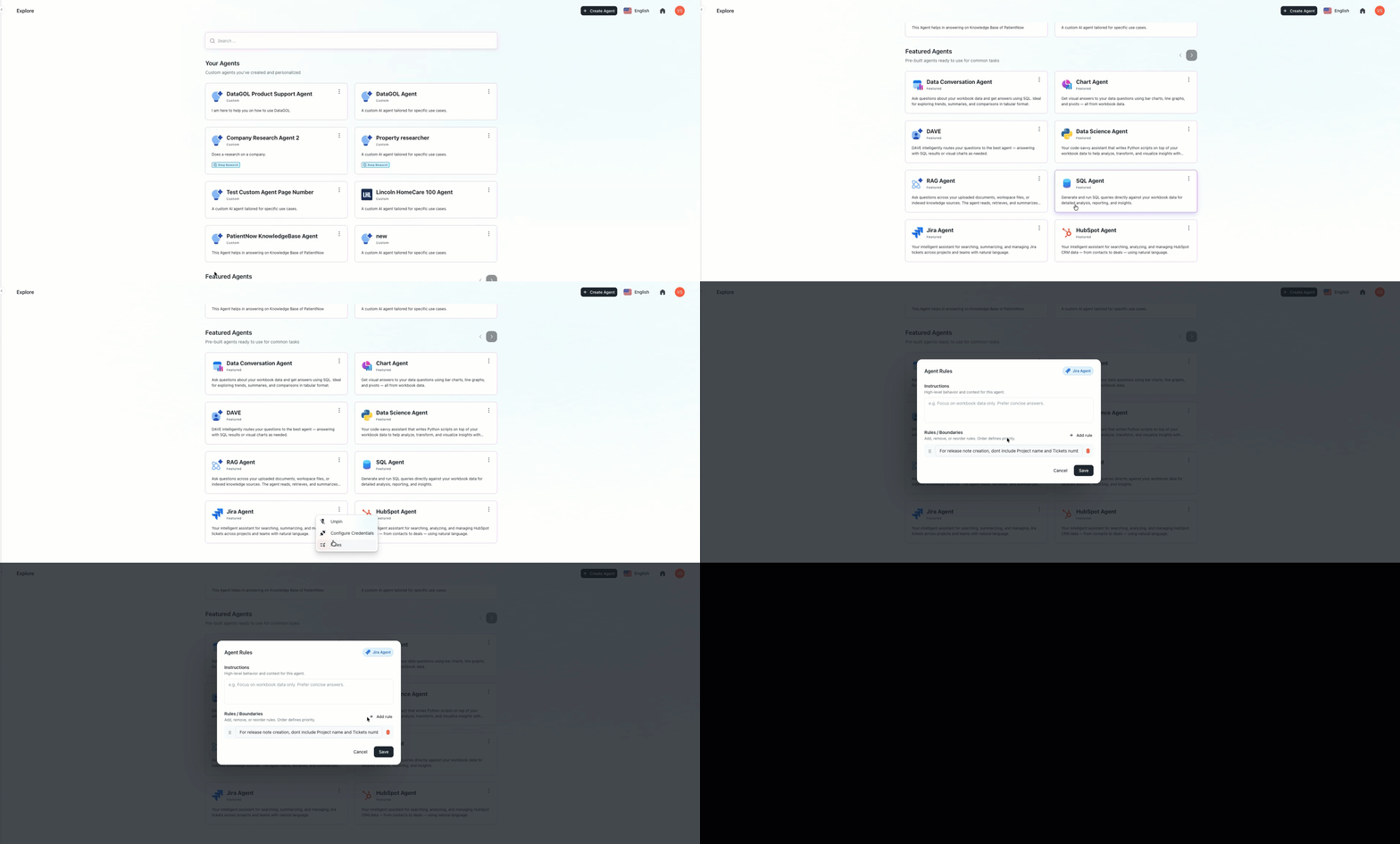
Centralized company-level agent instructions: A new management framework has been introduced that allows organizations to define custom rules and persistent context across all specialized AI agents. This configuration ensures that specific business logic, such as current project names or internal protocols, is consistently followed without needing to update each agent individually.
The system provides the flexibility to apply instructions globally or scope them to a specific tool, such as identifying the active sprint for the Jira Agent or defining lead qualification criteria for the HubSpot Agent. These company-level rules are automatically integrated during execution and take precedence over individual agent settings, ensuring that the entire AI workforce remains aligned with the latest organizational priorities and data.
-
Parser to handle docx files: The system now uses a more robust unstructured parser to handle Microsoft Word (docx) files. This transition significantly improves how text, tables, and formatting are extracted from uploaded documents.
Jira agent
-
Advanced Jira agent and official Atlassian integration: The Jira Agent has been upgraded to the official Atlassian Model Context Protocol (MCP) server, providing a more powerful and reliable connection for managing projects.
This update introduces deeper reasoning capabilities, allowing the agent to create and share step-by-step action plans before performing complex tasks like tracking sprint metrics or analyzing bug trends. To handle advanced data requests, the agent can now generate and run custom scripts to process Jira information with higher precision.
Transparency has also been significantly improved, as users can now see the agent's internal thinking process and the specific tools being used in real time. These changes ensure that every automated action is explainable, accurate, and capable of handling sophisticated project management queries.
-
Native charting and data visualization for Jira agent: The Jira Agent has been upgraded with the ability to generate visual charts and graphs directly from project data.
-
Added support for downloading CSV, PDF, and DOCX files within the Jira agent interface.
-
Secure Jira connectivity with OAuth 2.0: The Jira MCP Agent now supports OAuth 2.0, allowing users to connect their accounts through a standard Atlassian login screen instead of using manual API tokens. This update simplifies the setup process and strengthens security by ensuring the agent only accesses authorized data according to enterprise policies.
BI agent
Column type interchangeability in BI agent: Updated the BI agent to interpret data roles dynamically, moving away from rigid database-level classifications to better support natural language queries.
Previously, columns were strictly locked as dimensions, metrics, or date-times based on their database type. This prevented the agent from processing requests where a dimension needed to be counted (e.g., "count of categories") or a metric needed to be used for grouping (e.g., "group by employee ID").
The Column role resolution layer determines a column's role based on user intent rather than just its physical type.
-
Contextual role assignment: The agent now reclassifies columns as dimensions or metrics on the fly based on how you phrase your question.
-
Support for dimension aggregations: You can now perform calculations like
COUNTorCOUNT_DISTINCTon attributes that were previously restricted to grouping only. -
Metric-based grouping: Numeric columns can now be used as categories for grouping (e.g., "group by employee number") without causing visualization errors.
-
Adaptive visualization logic: The recommendation engine uses these resolved roles to suggest the most appropriate chart types for your results.
Backend
Refined the document management workflow to ensure data consistency between the workspace and the Onyx server.
-
Immediate chunk removal: The system now triggers an automated call to the Onyx delete chunks API the moment an indexed workspace document is deleted.
-
Optimized storage management: This improvement prevents orphaned data from persisting on the Onyx server, ensuring that search results and storage usage accurately reflect the current state of your workspace.
Playground
Persistent data provider selection: The Playground page has been updated to remember the selected data provider throughout an active session, preventing the need for repetitive selections. The selected data provider now remains active even if a user switches to a different browser tab or navigates to another section of the application.
Bug Fixes
Agents
BI agent
-
Logic conflict in multi-layer queries
Resolved an issue where the BI Agent was unable to use the same column for both filtering and grouping simultaneously. This prevented users from performing "vs" comparisons (e.g., "Processor 1 vs Processor 2") because the agent would filter the data but fail to group it for display. Users can now generate comparative visualizations involving specific filtered entities without the agent dropping the grouping dimension.
-
Case sensitivity in dashboard queries
Fixed an issue where the BI Agent used incorrect casing in queries, causing "Pin to Dashboard" and "Edit Widget" functions to fail. By strictly aligning the agent with backend schema naming conventions, these query errors are eliminated and widgets now sync correctly with the underlying database.
-
Web Connector | Auto-Scroll Scraper
Corrected a data loss issue by implementing an automated scroll sequence prior to scraping. This ensures that "infinite scroll" and lazy-loading elements are fully triggered, allowing the connector to capture the entire dataset rather than just the initial viewport.
Was this helpful?